Google may have set the pace in releasing a stable version of Android 11 for its phones earlier this month, but OnePlus isn’t far behind. After debuting Open Beta 1 for OxygenOS 11 on September 8. The company is already pushing out OxygenOS 11 Open Beta 2 to devices in the OnePlus 8 family. The new update fixes bugs and improves stability. It also introduces a new feature that takes ambient display to the next level aesthetically.
The first release brought a bunch of changes to OxygenOS. Includes a visual overhaul of stock apps like weather, settings, and messages. The changelog for Open Beta 2 indicates this update squashes a number of bugs, such as numbers disappearing when setting a timer and the Google Assistant falling asleep. It also helps improve general system stability. But just because it’s focused mainly on bug fixes doesn’t mean it’s entirely devoid of new features.
Also Read: ONEPLUS 7 AND ONEPLUS 7 PRO GETS OXYGENOS OPEN BETA 12 WITH APRIL 2020 SECURITY PATCH
New Feature’s
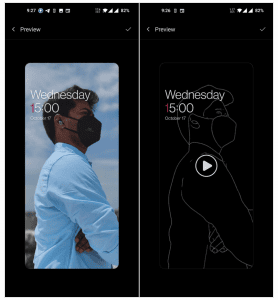
There’s a new feature called Canvas that automatically generates a wireframe image of your lock screen wallpaper to show off on the ambient display. Depending on what kind of wallpaper you have set for the lock screen, this could wind up looking super snazzy. To enable it, head to Settings -> Customization -> Wallpaper -> Canvas -> Choose photo preview.
How to Enroll for Beta Updates
If you’re curious about enrolling in the Open Beta program, learn more about it here, but be careful — this is beta software that could potentially brick your device. The new release should start rolling out to devices with Open Beta 1 installed via an OTA update soon. While you wait for OxygenOS 11 Open Beta 2, feel free to check out our coverage of Open Beta 1 for the full rundown on the new features it introduced in case you missed anything.
- Source:
- OnePlus Forum
Author Profile

Latest entries
 Tips & TricksNovember 7, 2025master_not_discovered_exception in Palo Alto Networks Log Collector
 Tech NewsAugust 17, 2025Malware Analysis For Remcos Remote Access Trojan (RAT)
 Tech NewsJune 10, 2025How to register and install iOS 26, iPadOS 26, and macOS Tahoe
 Tech NewsJune 1, 2025How to Install Cisco and Juniper Images in EVE-NG



0 Comments